MS-CHAP has been in use since 1998. It was Microsoft's answer to the challenge of authenticating users over networks, built into every version of Windows and deeply embedded in VPN and Wi-Fi infrastructure across the globe. It is also, as we will demonstrate, fundamentally broken - and the IETF is now formally deprecating it.
This guide covers what MS-CHAP is, how it works, why it is insecure, and what you should use instead.
Part of our Authentication Protocols Guide | In-depth analysis
In brief: MS-CHAP and MS-CHAPv2 are cryptographically broken authentication protocols that should not be used in new deployments. Both versions rely on DES encryption (cracked in 1998) and contain a design flaw that allows passwords to be recovered in milliseconds on commodity hardware. MS-CHAP also requires passwords to be stored as NT hashes, which are cleartext-equivalent in the event of a database breach. The IETF is formally deprecating MS-CHAP. For most environments, PAP with hashed password storage or EAP-TLS are the recommended alternatives.
Table of contents
What is MS-CHAP?
How does MS-CHAP authentication work?
MS-CHAPv1 vs MS-CHAPv2
MS-CHAP security vulnerabilities
Why MS-CHAP is deprecated
When MS-CHAP is still used
Alternatives to MS-CHAP
MS-CHAP (Microsoft Challenge Handshake Authentication Protocol) is a password-based authentication protocol developed by Microsoft. It was introduced in 1999 as part of Microsoft's Point-to-Point Protocol (PPP) implementation, and it was designed to authenticate users without transmitting their passwords in cleartext over the network.
MS-CHAP became widely deployed because of its deep integration with the Windows ecosystem. It is supported natively by Windows dial-up, VPN (via PPTP and L2TP), and 802.1X Wi-Fi authentication when combined with PEAP (Protected Extensible Authentication Protocol). For many years it was the default authentication method in Microsoft environments, and it remains present in a significant number of enterprise and ISP networks today.
The protocol sits within the broader RADIUS framework. When a user authenticates, the client device sends MS-CHAP data to the network access server (NAS), which forwards it in a RADIUS Access-Request packet to the RADIUS server for verification. The RADIUS server checks the credentials against its identity store and returns an Access-Accept or Access-Reject.
MS-CHAP comes in two versions: MS-CHAPv1 and MS-CHAPv2. Both are considered insecure. MS-CHAPv2 is the version in active use; MS-CHAPv1 is largely obsolete. Neither version should be used in new deployments.
For a broader look at where MS-CHAP fits within the authentication protocol landscape, see our guide to how authentication protocols work.
MS-CHAP uses a challenge-response mechanism to verify a user's identity without sending the password directly. The exchange works as follows:
- The authenticator (RADIUS server or NAS) sends a random challenge string to the client.
- The client takes the user's password, hashes it using MD4 to produce an NT hash, and then uses that NT hash together with DES (Data Encryption Standard) encryption to compute a response to the challenge.
- The client sends the response back to the authenticator.
- The authenticator performs the same calculation using the stored NT hash for that user and compares the result. If the values match, authentication succeeds.
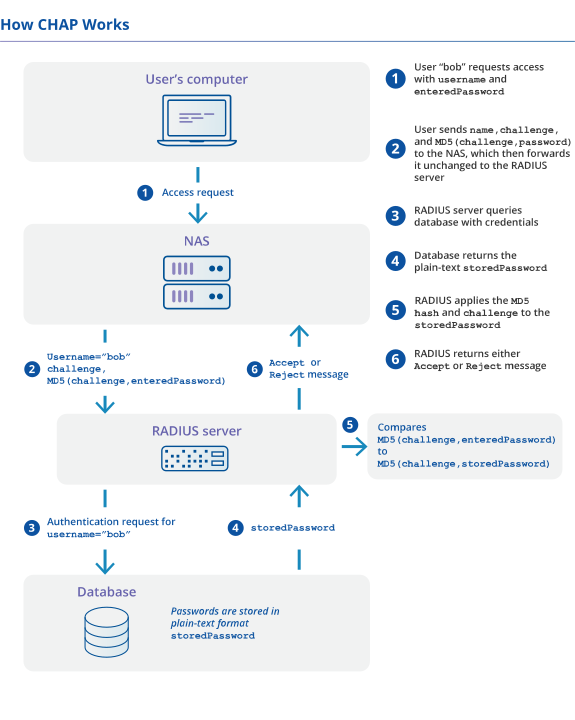
How MS-CHAP authentication works: the user's password is hashed to an NT hash and stored in the database in that form. The RADIUS server retrieves the stored NT hash and uses it to verify the MS-CHAP exchange (meaning a database breach immediately exposes every user's credentials).
The key point is that the exchange relies entirely on the security of MD4 and DES. MD4 is a message digest algorithm, and DES is a symmetric-key encryption standard. Both were already considered weak when MS-CHAP was designed, and both have since been thoroughly broken.
MS-CHAPv2 adds mutual authentication - the server also proves its identity to the client by computing a response to a challenge sent by the client. This was an improvement over MS-CHAPv1, but it did not address the underlying cryptographic weaknesses that make both versions insecure.
MS-CHAPv1 (defined in RFC 2433) and MS-CHAPv2 (defined in RFC 2759) share the same fundamental design: both use MD4 hashing and DES encryption, and both require passwords to be stored as NT hashes.
The main differences are:
Mutual authentication: MS-CHAPv2 introduced a server authentication step, meaning the client can verify it is talking to a legitimate server. MS-CHAPv1 offered no such protection. In practice, this distinction matters less than it appears, because the underlying cryptography in both versions is broken.
Challenge handling: MS-CHAPv2 uses separate peer and authenticator challenges, making some theoretical attacks slightly harder than in MS-CHAPv1. However, this does not prevent the practical cracking attacks described below.
Deployment: MS-CHAPv1 is rarely seen in modern networks. MS-CHAPv2 is still widely deployed, particularly in PEAP configurations for 802.1X Wi-Fi and in legacy VPN environments.
For practical purposes, both versions should be treated as insecure. The cryptographic vulnerabilities described in the next section apply to both, and the IETF deprecation covers both versions.
MS-CHAP depends on cracked DES encryption
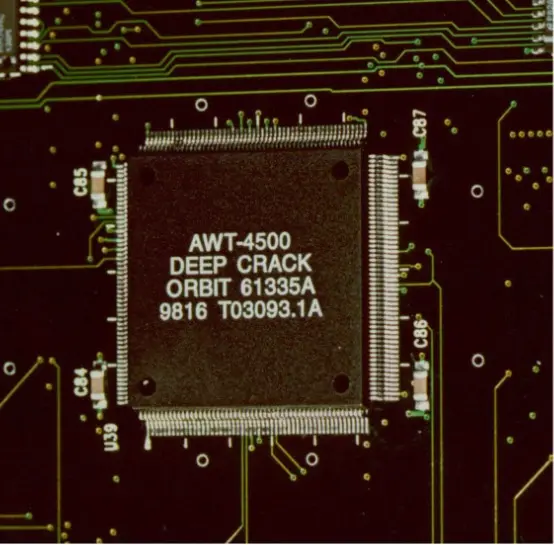
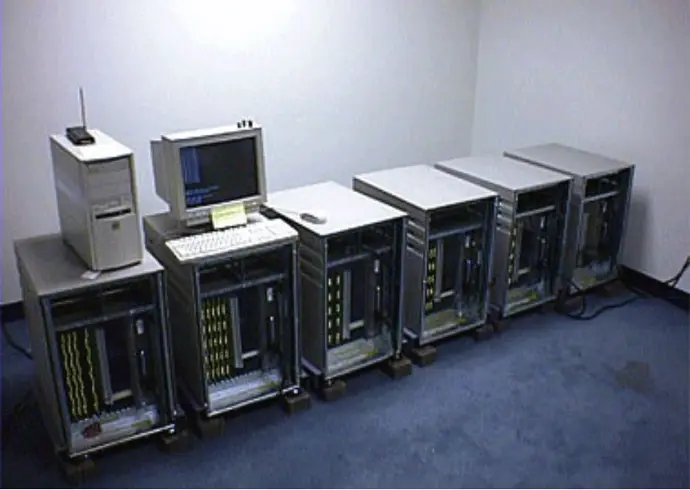
The Deep Crack microchip, developed by the Electronic Frontier Foundation in 1998 to brute-force DES encryption (the same algorithm MS-CHAP relies on).
MS-CHAP implementation of DES is flawed
Even if DES was completely secure, there is a key flaw in the design of MS-CHAP that makes it highly vulnerable to attacks. To understand the flaw in MS CHAP we need to look more closely at how DES is integrated with the protocol.
As part of the handshake protocol, MS-CHAP exchanges a 16 character NT hash of the password. These keys are mapped to DES keys, which uses 56 bit (7 characters) for keys for its encryption. The mismatch means that in order to use the NT hash with DES, there are 3 separate DES operations as seen below.
Each byte of the NT hash maps to a DES key, but that leaves five (5) bytes left over. So the last DES key only uses the first two characters for the NT hash, and the rest of the key is filled with padding, which is all zeroes.
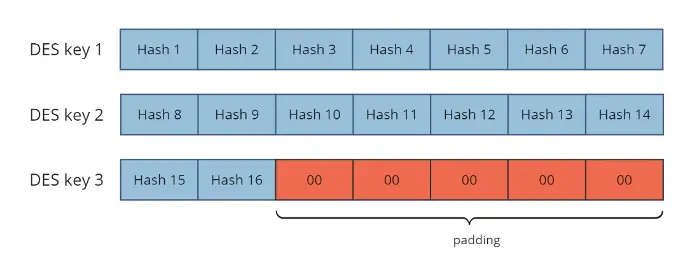
How
MS-CHAP maps NT hash bytes to DES keys. The final DES key is padded
with zeroes, reducing the search space from 2⁵⁶ to just 2¹⁶. This is the core design flaw that makes MS-CHAP crackable in milliseconds.
This is the key flaw in the MS-CHAP implementation. Instead of filling out the last five characters of the final DES key with secure data (for example, by wrapping around to the beginning of the hash and re-using “Hash 1”, “Hash 2” etc), it is simply padded out with zeros. This means that the final DES key has only 16 bits of actual key data, and the rest of the key bits are known.
The problem space is now only 216, instead of 256. In other words, for DES key 3, there are only slightly over 65,000 possible values instead of over 72 Quintillion. On modern hardware, it is possible to “brute force” search all possible values for DES key 3, and find those 16 bits. While this attack is brute-force, 216 is not a large number, and doing 216 DES operations is trivial for any modern computer.
All that remains then is to crack the remaining 14 bytes of the NT hash. Admittedly, this is still a lot of key space to search: 2(56+56) or 2112 which is a huge number. However in 2012, a key insight showed that you could leverage the design of MS-CHAPv2 to instead search only 256 possible keys, which could be cracked using a brute force attack in less than a day.
This time can be further reduced by noting that most passwords are generated by users, and in computer security terms, do not have large entropy. In human terms, that means that the passwords are likely to be re-used, and therefore guessable.
We can make many guesses by using freely available lists of most frequently used passwords, and creating pre-build “dictionaries” which precompute the NT hash values for those passwords. These dictionaries can also be created for any additional information about targeted individuals such as birthdays, pet names, children names, company names / projects, etc. A simple program can generate hundreds of millions or billions of such guesses, and store them in a simple database on commodity hardware. This database would take at most a few tens of gigabytes of space, which is less than many high-end games..
The final nail in the coffin
In 2021, the final nail in the coffin of MS-CHAP security was demonstrated by leveraging a novel strategy of:
- Brute force cracking the third DES key to get the last 16 bits of the NT-hash,
- Storing a database of billions of guessed passwords and their NT hash, indexed by the final 16 bits of the hash
- Using the found DES key to get a list of guessed passwords (index lookups are fast), which reduces the search space by 216
The result was that it with a little bit of work and disk space, it is now possible to obtain the underlying MS-CHAP password very quickly, with much less than 256 possible work.
That is, if the database stores a table of 4 billion passwords, then dividing that search space by 216 means that the system only has to brute-force check about 65,000 passwords. The result of this algorithm attack means that MS-CHAP can be cracked by checking 64K DES keys, and then using large tables to get another 64K NT hashes to check. The combined cost of these two operations is very, very, small. A laptop with a few gigabytes of memory and a large SSD can crack MS-CHAP in only a few milliseconds.
In other words, if your organization sent MS-CHAP over the internet with user generated passwords, you can assume that those passwords are now in the hands of malicious actors, or the NSA, or both.
The attacks described above have been known for years - the first public tool to crack MS-CHAPv2 appeared in 2012, and it was offered as a service for $20 per exchange. Despite that, no official standards document existed telling network engineers to stop using it. That gap is now being closed.
The IETF is developing a best-practices document for RADIUS security that explicitly deprecates MS-CHAP. The document identifies the circumstances under which MS-CHAP is no longer acceptable - which covers the majority of current deployments - and provides formal guidance on alternatives. A companion document recommends PAP over CHAP and MS-CHAP where possible, along with clear guidance on the trade-offs involved.
Microsoft itself has acknowledged the weaknesses in MS-CHAPv2 in its own security advisory at msrc-blog.microsoft.com. Anyone who can observe an MS-CHAP exchange can run easily available cracking tools, such as chapcrack on GitHub. The cost of cracking MS-CHAPv2 has only decreased since that advisory was published.
While some people still claim that MS-CHAP is secure when wrapped in PEAP or TTLS, it is important to understand the limits of that mitigation. PEAP does protect the MS-CHAP exchange from network observation, but only when client-side certificate validation is enforced. Without that, a rogue access point can intercept the inner exchange and crack it offline.
More fundamentally, MS-CHAP still requires passwords to be stored as NT hashes in the database. NT hashes are cleartext-equivalent: an attacker who breaches the database can authenticate as any user without cracking anything. PEAP provides no protection against this.
Our recommendation: do not use MS-CHAP. Adding a PEAP or TTLS wrapper helps against some attackers in some configurations, but the underlying protocol remains insecure.
Despite its known weaknesses, MS-CHAP persists in a number of environments. Understanding where it appears helps with planning a migration.
Legacy VPN infrastructure
MS-CHAP is the native authentication method for PPTP (Point-to-Point Tunnelling Protocol) and is also commonly used with L2TP/IPsec VPNs in older Windows environments. Organisations that have not updated their VPN infrastructure since the early 2010s may still be running MS-CHAP without realising it.
Active Directory dependencies
Active Directory stores user passwords as NT hashes. Because MS-CHAP is designed around NT hash verification, it is often the only option when RADIUS must authenticate directly against AD without additional infrastructure such as Samba. This is the most common reason organisations continue to use MS-CHAP today, and it is the most technically constrained migration path.
PEAP-MSCHAPv2 for 802.1X Wi-Fi
Many enterprise Wi-Fi deployments use PEAP with MS-CHAPv2 as the inner authentication method. This configuration has been the default in Windows and iOS for many years and remains in wide use. It is not inherently catastrophic when certificate validation is properly enforced, but it carries risks and should be migrated away from over time.
Backward compatibility requirements
Some network access equipment (particularly older switches, routers, and wireless controllers) was shipped with MS-CHAP as the only supported authentication method. Where hardware refresh cycles are long, this can be a significant constraint.
In all of these cases, MS-CHAP should be treated as a temporary measure pending migration, not a long-term solution. Here are the recommended alternatives.
PAP with TLS: the recommended option
We always maintain that the most secure protocol for authenticating users is PAP. Using PAP means that passwords can be stored in the database in a salted, hashed form. Given that the vast majority of data breaches succeed by targeting password databases, storing passwords in an encrypted form is definitively the most secure approach for any authentication system.
PAP is also simpler to deploy and compatible with a wider range of identity stores than MS-CHAP. For Wi-Fi and 802.1X environments, EAP-TTLS with PAP in the inner tunnel provides strong security: TLS protects the credentials in transit, and PAP allows secure hashed storage at the server. This is the approach used by the eduroam community.
For more detail on why PAP is more secure than it is commonly portrayed, see our articles Is PAP secure? and PAP vs CHAP.
EAP-TLS — the strongest option
EAP-TLS uses digital certificates rather than passwords for authentication. It is the most secure authentication method available for 802.1X environments, and it eliminates the NT hash storage problem entirely because no password database is involved in the authentication exchange. The trade-off is deployment complexity: a certificate infrastructure (PKI) must be in place for both the server and all client devices.
For organisations that can support it, EAP-TLS is the gold standard. For those that cannot, EAP-TTLS or PEAP with PAP is the next best option.
If you cannot move away from MS-CHAP immediately
The most common constraint is an Active Directory dependency. If Active Directory is your identity store and you cannot introduce Samba or an alternative intermediary, MS-CHAP may be the only protocol that works without significant infrastructure changes.
In that scenario:
- Always run MS-CHAP inside PEAP or EAP-TTLS.
- Enforce certificate validation on all client devices. Without this, the TLS tunnel provides no protection against rogue access points.
- Encourage users to use machine-generated passwords, which are less likely to appear in pre-built cracking databases.
- Treat migration away from AD as an authentication backend as a medium-term objective.
Need help moving away from MS-CHAP?
InkBridge Networks has been helping clients around the world design and deploy their RADIUS infrastructure for over 20 years. We specialise in complex systems and have seen pretty much every variation and problem out there. If you want help from the people who wrote FreeRADIUS, visit our contact page to get in touch for a consultation.
Frequently Asked Questions
Q: What is MS-CHAP?
MS-CHAP (Microsoft Challenge Handshake Authentication Protocol) is a password-based authentication protocol developed by Microsoft for use in VPN and network access scenarios. It uses MD4 hashing and DES encryption to verify user credentials without transmitting passwords in cleartext. Both versions (MS-CHAPv1 and MS-CHAPv2) are now considered cryptographically broken and are being formally deprecated by the IETF.
Q: Is MS-CHAPv2 secure?
No - and neither is MS-CHAPv1. Both versions rely on DES encryption, which was cracked in 1998 and deprecated in 2002. The flaw is in the MS-CHAP design itself: a zero-padding vulnerability in how MS-CHAP applies DES reduces the effective key space from 2⁵⁶ to just 2¹⁶, making it brute-forceable on a laptop in milliseconds. Neither version should be used outside of a secure TLS tunnel, and even then only where no better option exists.
Q: What is the difference between MS-CHAPv1 and MS-CHAPv2?
MS-CHAPv2 added mutual authentication, meaning the server proves its identity to the client as well as the reverse. It also changed how challenges are handled. However, both versions use the same broken MD4 and DES cryptography, so neither is safe for use in modern deployments.
Q: Can MS-CHAP be made secure with PEAP or TTLS?
Partially. Running MS-CHAP inside PEAP or EAP-TTLS protects the exchange from network observation, but only when certificate validation is properly enforced on the client side. It does not address the more serious problem: MS-CHAP requires passwords to be stored as NT hashes, which are cleartext-equivalent. A database breach exposes every user's credentials regardless of what transport the protocol runs over.
Q: What should I use instead of MS-CHAP?
For most deployments, PAP with hashed password storage is the more secure option, contrary to common belief. For Wi-Fi and 802.1X environments, EAP-TTLS with PAP in the inner tunnel provides strong security. EAP-TLS with certificates is the strongest option where a PKI is available. See our articles on Is PAP secure? and PAP vs CHAP for more detail.
Q: Why is MS-CHAP being deprecated by the IETF?
The IETF is developing a best-practices document for RADIUS security that formally deprecates MS-CHAP. Despite cracking tools being publicly available since 2012, no official standards document previously existed advising against its use. The new document identifies the conditions under which MS-CHAP is no longer acceptable and provides guidance on alternatives, including a formal recommendation of PAP over CHAP and MS-CHAP where possible.
Related Articles

Is PAP secure?
A common misconception is that PAP is less secure than other authentication protocols such as CHAP, MS-CHAP, or EAP-MSCHAP(v2). This perception arises because of a misunderstanding of how PAP is actually used.

PAP vs. CHAP
There is a lot of confusion around the security of PAP versus CHAP. While there are many web sites which claim to compare the security of these two authentication methods, most of these comparisons are shockingly wrong.