Inkquire: FreeRADIUS Debug Viewer
Find out what you need to know.
Run FreeRADIUS in debug mode (
radiusd -X) and you’ll see exactly what the server is doing. The problem is working out what's important.
The FreeRADIUS Debug Viewer is a free tool that presents the debug output in a structured view so you can search, filter, follow requests, and surface errors without scrolling through thousands of lines of text.
It’s the first tool in Inkquire, a growing suite of tools from the people who built FreeRADIUS.
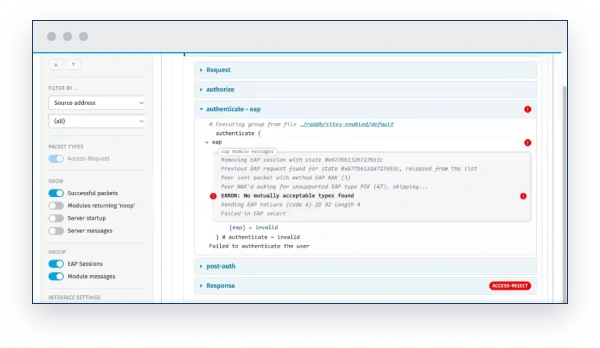
The FreeRADIUS debug logs have plenty to say.
FreeRADIUS can do a lot. But it can be difficult to configure. That’s where debug output comes in. Run the server in debug mode (
radiusd -X) and you get the whole story: server startup, packets, modules, EAP sessions, warnings, errors, and everything around them.
Except the debug output is large and complicated.
Now you have two problems.
You could ask questions on a forum or a mailing list. Or paste the output into an AI tool. You might get help, but it means sharing potentially sensitive data, and the answer may still be wrong. Redact too much info first, and you might remove the context needed to solve the problem.
What you need is an expert local tool, built on decades of FreeRADIUS experience and a deep understanding of the server.
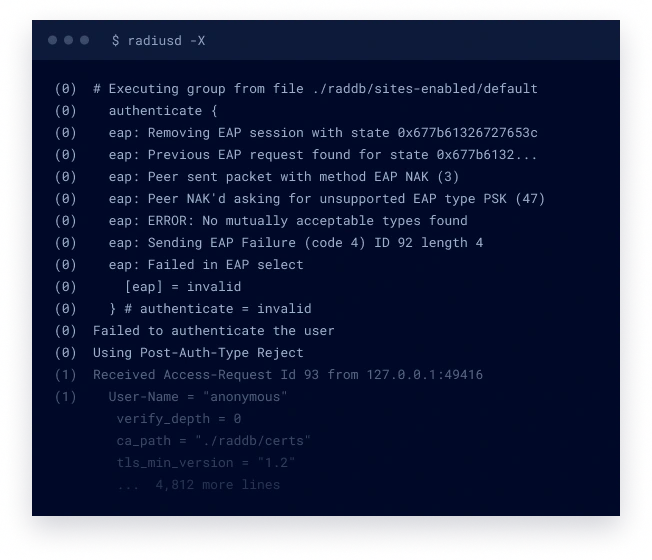
Find the problem quickly. Understand the solution.
The FreeRADIUS Debug Viewer is the first tool in Inkquire. Load your
radiusd -X output and it turns thousands of lines of text into a structured view you can search, filter, and follow.
It highlights errors and warnings and, in most cases, points you to the root cause and recommended solution.
It’s a free tool from us, the people who built FreeRADIUS.
It’s made just for you, the people who run it.
Organise the output
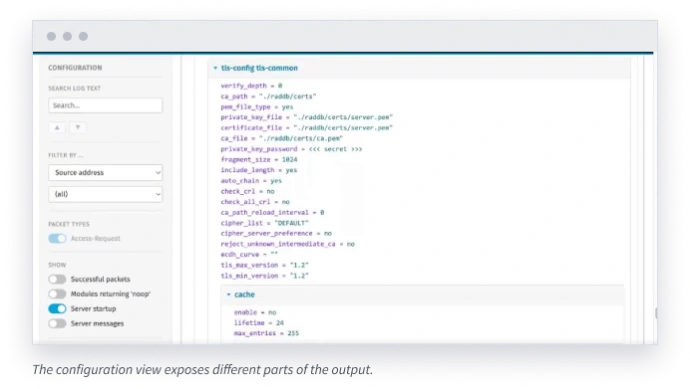
The Debug Viewer parses the output into hierarchical blocks, keeping the most important information onscreen. Other detail is summarised and hidden until you need it.
Find errors and solutions
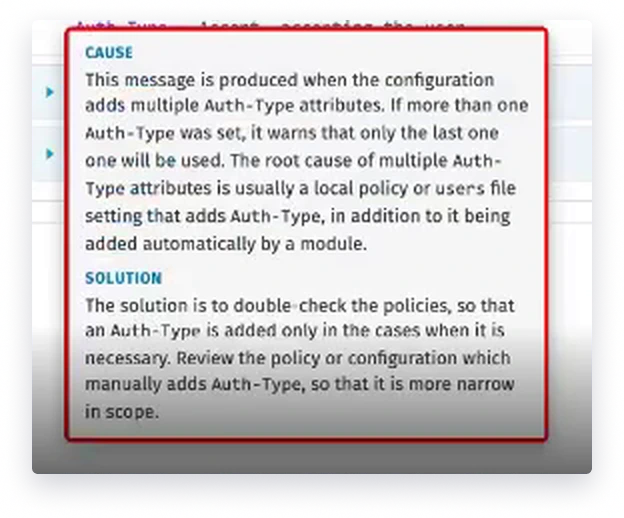
Errors and warnings are highlighted, even in summary views. Hover over an error to see help explaining the cause and the recommended solution.
Follow requests and sessions
Request and response packets are grouped together, even when the related messages appear thousands of lines apart. Multi-round EAP sessions are tracked and grouped together too.
Filter out the noise
Hide information that is not relevant to the problem you are solving, including Accounting-Request packets, successful packets with no errors, and module messages that do not affect the result.
Search the full output
Search the complete debug text directly instead of scrolling line by line. You keep the full context while jumping straight to the messages you need.
All of this capability lets you quickly filter out irrelevant information. What’s left is exactly what you need to know in order to fix the problem.
In most cases, you can load the debug output and go straight to the root cause and solution.
How it works
- Run FreeRADIUS in debug mode and capture the full output.
- Load the output into the FreeRADIUS Debug Viewer.
- See where the error is, why it happened, and what to do about it.
- Or search, filter, expand, and follow the messages you need.
The first tool is free.
The FreeRADIUS Debug Viewer is the first tool in Inkquire, a growing suite from InkBridge Networks for people who run and depend on FreeRADIUS.
The Viewer focuses on debug output. Additional Inkquire tools are already in internal alpha testing, with more capabilities planned to help you monitor, audit, optimise, and understand your FreeRADIUS system.
The goal is to give you useful, accurate answers and actionable recommendations when something goes wrong.
The Debug Viewer is free. As Inkquire grows, we’ll ask what problems you want us to solve next. Your feedback will help shape the tools we build.
FreeRADIUS Debug Viewer
FREEAvailable now. Runs locally on the output of
radiusd -X.
More Inkquire tools
IN ALPHA TESTINGMonitor, audit, optimize, and understand all aspects of the FreeRADIUS configuration and log output.
Your information stays local.
The FreeRADIUS Debug Viewer runs locally. It does not need AI or cloud processing, and it does not depend on statistics or heuristics.
Future Inkquire tools may use AI or cloud services, but only when you choose to use them. You will always have the option to anonymise sensitive information before it is sent outside your network.
Inkquire follows the FreeRADIUS philosophy of keeping you in charge. There are no secret uploads or back doors, and your data remains yours to keep.
Get the Viewer
The Debug Viewer is free. Sign up now and we'll send you the download link after our October 29 webinar.
Built by the people who built FreeRADIUS
The core team at InkBridge Networks, led by Alan DeKok, founded FreeRADIUS and continues to maintain it.
We’ve worked on the server for more than 25 years, written most of the standards behind it, and deployed it in thousands of networks. We know the strange edge cases that show up in production because we’ve spent decades solving them.
General-purpose AI tools are trained on public information. InkBridge has access to decades of FreeRADIUS knowledge, development history, and real-world experience that those systems do not.
Inkquire puts that experience into tools you can use every day.